Glossier CEO: We’re Building this People-Powered Ecosystem

Glossier is both a beauty company and a tech company that is succeeding by staying incredibly connected to their customers. Glossier founder and CEO Emily Weiss says that they are building a people-powered ecosystem where they are co-creating with their customers.

Not only do they ask for feedback from their customers, but they communicate with them on a Slack channel directly. This level of communication with consumers makes Glossier unique and is what powers their product creation and innovation.

Emily Weiss, Glossier founder and CEO, recently discussed the people-powered ecosystem that makes Glossier a unique kind of company with Kara Swisher for her Recode Decode podcast:

We’re Building this People-Powered Ecosystem

Glossier is a pretty unique kind of beauty company that’s also a tech company. So it’s hard for me sometimes to answer that question, are you beauty or are you tech? I think we’re both. Right now at a glance were about 200 full-time employees across three offices in New York, Canada, and London. We’re about 70 percent female. Our board is 60 percent female. Our engineering team is 50 percent female. It looks a little different than most tech companies. We just crossed last year well over a $100 million in revenue. We’re very excited about that.

The way we look at it is that we’re building this people-powered ecosystem. Since we launched four and a half years ago, we have co-created with our consumers. The reason we’re able to do that is because we know who they are. We have a direct relationship with every single person who buys something from us, unlike you all of the incumbent companies that have been built through retail channels. We’ve never existed through retail channels. We have no plans to exist through retail channels.

Using Technology to Do Things Differently

The reason being we think that through using technology we can do three things very differently than what all beauty companies have done in the past. One is channel. The second is discovery. The third is listening at scale. Fundamentally, we just think about how do to give people amazing experiences.

In that way perhaps we’re similar to Amazon in that they’re extremely devoted to the customer. We’re very devoted to the customer from the standpoint that we don’t want to put things that aren’t amazing into the world.

Since we launched we’ve always relied a lot on user-generated content and feedback. We really started out of a blog that began in 2010 that was all around this premise that people are going to drive purchasing decisions in the future. Not algorithms. Not upselling or cross-selling. If anything, upselling and cross-selling people’s opinions, helping to evangelize people’s voice such that people can decide what they want.

At Glossier, we’ve really taken user feedback and asked them for things like what products to make, and where to go in terms of pop-ups or countries. We have fundamentally been able to really change the relationship between brands and customers.

Make Incredible Things That Stand the Test of Time

Traditionally, the way that I grew up with beauty products and brands was always sort of from brands speaking top down to customers. They are saying you’re not good enough, saying you don’t know what you want, let us tell you what you want. Really dictatorial. In a way, not giving people enough credit to be able to say, hey, actually I use this deodorant every day. So I am an expert at this deodorant. Seriously, we are all experts on the things that we consume and the things that we use.

What we’re trying to do is provide the tools, whether it is the physical products that we’ve created over the last four years or the digital conduits that we’re creating now. In the future we hope to help people use their voice and say, hey, how can I help someone else talk about what they’ve learned about beauty and their products and hopefully inspire others.

We’ve just typically had a pretty simple premise which is making incredible things that can really stand the test of time. That has equaled so far building these very modern essential products that we hope become icons in the same way an iPhone or an Air Jordan became essential products. Hopefully in thirty years time Boy Brow will connect a fifteen year old in the Middle East to a billionaire in Silicon Valley and we’ll be cross generational and cross socio-economic.

We get very excited about creating quality things that make people want to talk about them. Just period full stop. Over 70 percent of our growth so far has been through owned, earned, peer-to-peer, or organic because people just fundamentally want to share that they enjoyed their Boy Brow.

For Us It Has Been Quite Analog

This is something that people are really curious about. I think especially in this age of machine learning for us so far a lot of it has been quite like analog. It’s just been posting on the platforms that we have or in our Slack channel, where we have a lot like several hundred top customers, and saying what’s your dream face wash?

Sometimes, that’s the way in which we will make product decisions. But typically, it’s really an art and a science. It really depends on the project and how involved we’re going to get versus just sort of say in the office what are we excited about?

Our Innovation Comes From Staying Connected

We stay very connected. Every every team at the company, we’re about a third TAC across engineering, digital product, data, and design. Then we have an in-house creative team and we have in-house R&D. I think we’re all very connected to the to the customer. We have all of our Net Promoter Score feedback and comments from every single customer who answers it.

We are constantly taking into a Slack channel that everyone from me to my assistant to an intern can read every day just to stay connected to the customer. Sometimes it’s a single comment or sometimes it’s a macro trend that we that we hear about the translates into innovation.

The post Glossier CEO: We’re Building this People-Powered Ecosystem appeared first on WebProNews.

Quick Ways to Make Your Google Ads Stand Out from the Competition

Google Ads amounts to billions of dollars in revenue for the search engine giant, but what about your revenue?

Standing out in this competitive-and, let’s face it, cluttered-environment can be a huge challenge for advertisers, especially if they’re just starting out. There’s only so much space on a search results page to go around, after all.

As we enter the 2018 holiday season, it’s the right time to take a good, hard look at your stale ads. It’s time to breathe some new life into them.

With that in mind, here are the features the pros use to stand out from the competition:

The Latest Expanded Text Ads

Google made their standard text ads larger by introducing expanded text ads (ETAs) in 2016. The increased character count was a boon for advertisers because it enabled messaging to reflect more of the advertiser’s key incentives.

Experts jumped on this new format immediately, even though Google didn’t require they switch until January 2017. Even then, advertisers could continue to run standard (shorter) ads, but they couldn’t edit them or launch new ones.

Some people hesitated, but advertisers who were slow to switch were at a disadvantage compared to those who immediately moved to the new format. The go-getters ended up with a huge head start since ETAs proved to have higher clickthrough rates (CTRs) than standard ads.

(And good CTRs = good quality scores = lower CPCs = better ad positioning.)

Now you have this opportunity again!

In August, Google further expanded their text ad format-expanded expanded text ads?-but taking advantage of these new character limits is still optional (hint: you should use them).

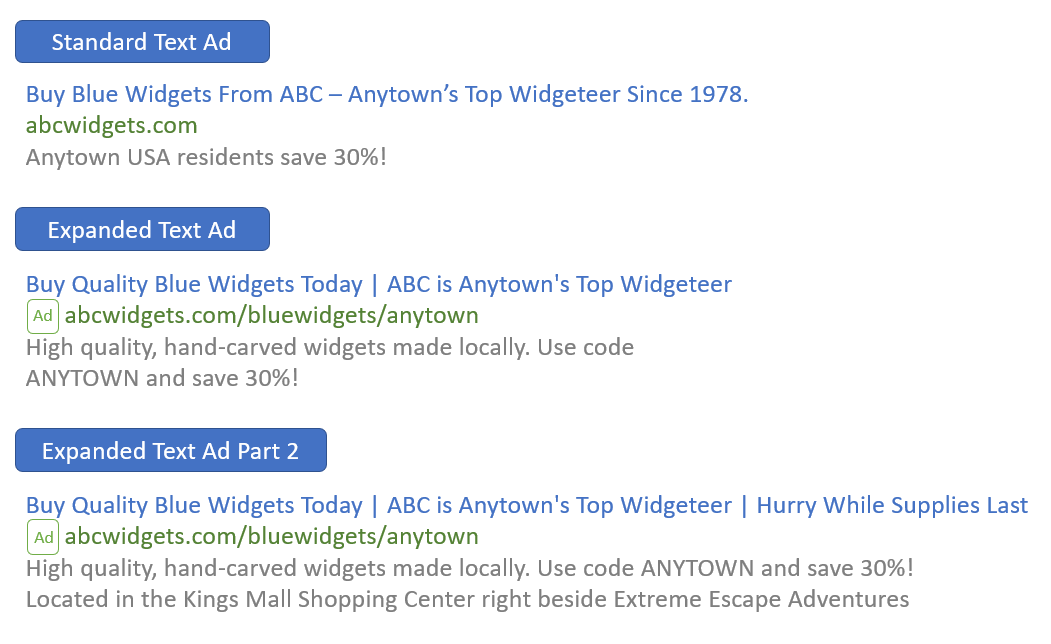
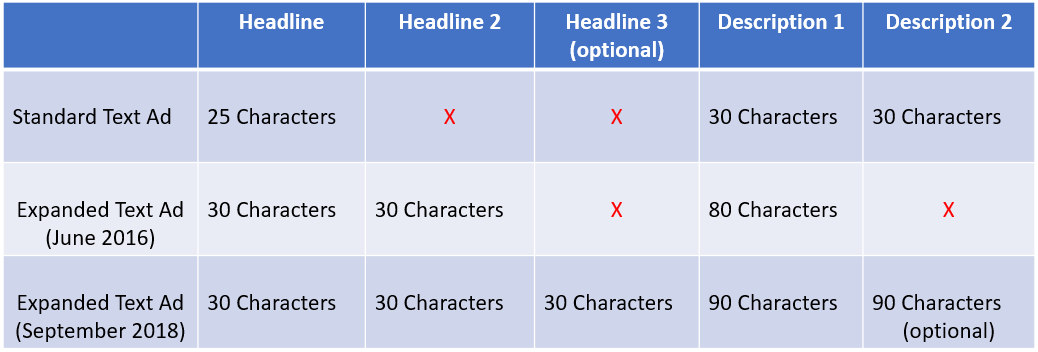
The latest iteration of expanded text ads introduces a second headline and more characters to all text fields, making text ads even more prominent. Here’s what’s new:

  • An additional, optional headline of up to 30 characters
  • An additional, optional description line
  • Both description lines can now be up to 90 characters (increased from 80)

And here’s a comparison of the three ad formats:

Google’s expanded text ads give you more space to connect with prospects.

These longer character counts may not sound like much-oh boy, ten more characters!-but they add up and can have a significant impact on how your ads look (and how they convert). See for yourself how the three types of ads look in a side-by-side comparison:

An example of how these ads appear in the search results.

The new ETAs feature up to 218% more text than the original “standard” format. As expected, search experts are already updating their ads to capitalize on the latest change-and this time you should too!

Even though the extra headline and description won’t show up all the time, they’ll help you stand out when they do by making the ad itself bigger. The third headline also gives you an extra thirty characters of highlighted blue text at the top of your ad.


Ad Extensions

Ad extensions are optional snippets of text that users can append to their ads. Google introduced the first extension-sitelinks-way back in 2009. These short links appear beneath the ad and direct searchers to different pages of the advertiser’s website.

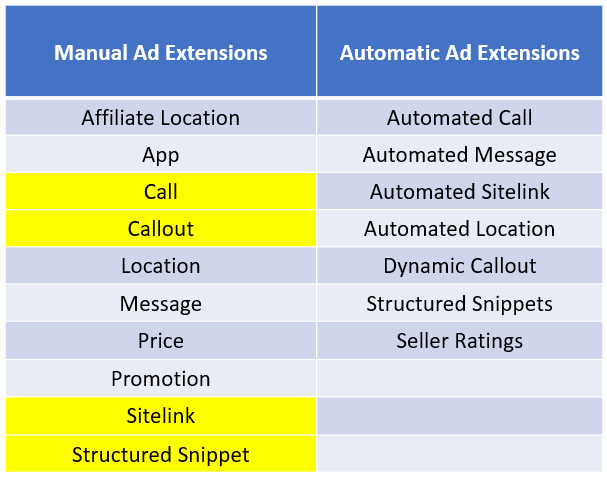
But why stop there? There are now ten different types of manual extensions and six automated extensions that advertisers can use to compel more clicks:

Google ad extensions are free to implement and often improve your ad’s CTR.

On average, an ad’s CTR has the potential to improve by 10-15% per extension. Aside from adding functionality, extensions increase the surface area of your placement and are free to implement, so they’re a no-brainer.

Though every ad extension is potentially useful, there are four (highlighted in yellow above) that you must use (if you’re not already). This is because they’re easy to implement and they allow you to feature critical incentives and information about your business that would otherwise take up valuable ad copy.

1. Sitelinks

Sitelinks are valuable because they allow you to link deeply into your site. The number of sitelinks associated with your ad varies from 2 to 8. A great tip is to create specialty landing pages for each sitelink which are goal oriented and customized to the link. You can customize sitelinks at the ad group level too, making them even more relevant to specific searches.

Expert Tip: The Unbounce Builder is an excellent tool for quickly creating landing pages that match your ads’ sitelinks.

2. Callouts

Callout extensions can be up to 25 characters each and are not clickable. They promote features, benefits, and selling points of your business. They’re also a great way to highlight specific qualities of your business that you don’t have room to showcase in your primary ad copy. For instance, 250 5 star reviews, 5 convenient locations, all credit cards accepted, etc.

3. Call Extensions

Call extensions add a phone number without wasting any of the primary copy. On mobile devices, a callout extension lets people tap a button to call your business directly. Implementing call extensions is quick and easy, so you should include them in all applicable ads.

4. Structured Snippets

This extension gives users the option to include a list of products or services beneath their ad. Structured snippets contain a category header (e.g., services) followed by a list of items (e.g., pet grooming, pet sitting, dog training, de-shedding).

Using all of these snippets is a great way to differentiate your ad from competitors’ ads. You can get creative too. For example, if you’re a B2B database host, you could list the features included in your service (e.g., Cloud Automation, Advanced Security, Easy-To-Use Data Browser).

It’s worth noting, though, that when it comes to the categories you can choose, you’re restricted to Google’s preset list. The full list of snippet categories (headers) is available here. Here are some other structured snippet examples based on different ones:

  • Amenities: Free WiFi, Sauna, Early Check-In, Concierge Service, Continental Breakfast
  • Brands: Urban Decay, bareMinerals, Nyx, Tarte, Too Faced
  • Courses: Financial Training, Investment Banking, Business Economics, Fundraising

Using a few of the available extensions creates more opportunities to capture your prospects’ attention. It can even push your competition further down the page!

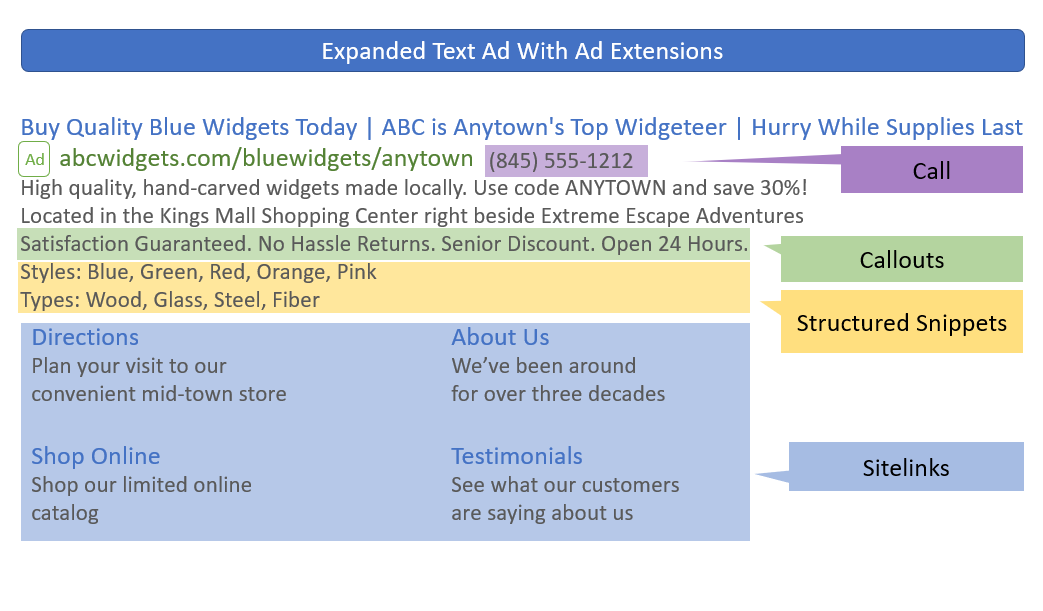
Here’s an example of how an ad would appear if all the above extensions showed at once:

An ad with structured snippets, call, callout, and sitelink extensions enabled.

Expert Tip: Not all ad extensions show up all the time, and they appear differently on mobile devices versus desktops. Google’s system tries to match the most appropriate extensions to the most relevant searches.


Geotargeting and other important settings

Implementing ad extensions along with the latest ETA format is sure to get advertisers more clicks. Yet this can be a double-edged sword because (sadly) most of us don’t have an unlimited budget.

Fortunately, there are some settings and features that you can (and should) use to minimize clicks from unqualified traffic. The settings we’re going to focus on are bid modifiers, geotargeting, remarketing for search ads (RSLA), ad scheduling, and negative keyword lists.

Bid Modifiers

Bid modifiers, or adjustments as Google calls them, enable you to increase or decrease bids based on when and how people search. Bid modifiers can apply to devices, locations, ad scheduling, and more. Advertisers bid up or down by percentages.

For example, if you want to bid more aggressively on mobile searches, you can adjust your bids to +30% for mobile devices. Likewise, if you want to appear for desktop searches, but would rather pay less for these types of clicks, you can adjust your bids to -30% for desktop devices.

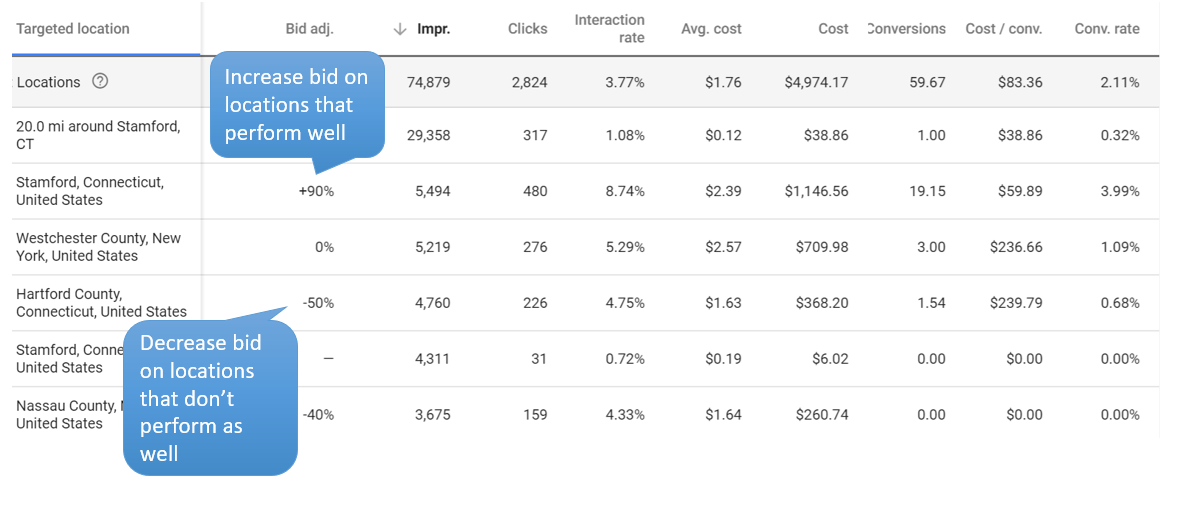
Expert tip: Use Google’s reporting tools to test how your modified segments are performing and adjust bids regularly. You can review performance by location, audience, device, time of day, and more right from the Google Ads main interface.

An example of locations segment (via Google Ads)

Geotargeting

There’s more to geotargeting than just showing your ads in your desired locations. You can also refine where your ads appear by excluding certain locations and regions. You can get granular with this too by increasing or decreasing bids to your targeted areas using bid modifiers.

Geotargeting improves your ROI by minimizing clicks from unqualified prospects (e.g., people outside of your service area, neighborhoods below a certain income threshold, etc.). So it’s well worth the time it takes to set up and refine.

Ad Scheduling

Maybe you’re not open on weekends. Maybe no one is operating the phones after 8 pm every night. Maybe your strongest return on ad spend occurs between the hours of 10 am and 1 pm every day. Once you figure out the best time of day for your ads to appear, you can use scheduling to choose exactly when they show. This is an especially great feature when you have a limited budget.

Remarketing for Search Ads (RSLA)

Remarketing isn’t just for display ads anymore! This feature allows you to target search ads to people who have already visited your site. Your ads then appear when they search on Google for the keywords you’re bidding on. You can either append RSLA lists to existing ad groups or create groups that only show ads if a searcher is on your remarketing list. Google provides detailed instructions for setting up RSLA campaigns. It’s definitely worth investing the time to read.

Negative Keyword Lists

You can ensure your ad isn’t triggered for undesirable keywords by creating negative keyword lists and applying them at the account, campaign, or ad group level. The new Google Ads interface makes creating and assigning negative keyword lists simple. Create themed lists (e.g., competitors, locations, common terms) and assign them based on account performance or structure.

Expert tip: Check out Google’s search terms report to see exactly what people are searching for when they look at your ads, and then use this info to build your negative lists.


We’ve only scratched the surface…

The good news is that there are things you can (and must) do to make your brand stand out and to ensure it’s reaching the most qualified prospects.

Google gives you some powerful tools to help improve the clickthrough rate of your ads, which contributes to a higher quality score. And, in turn, higher scores help drive down your cost per click, give you a higher impression share, and make your ad more likely to show up than your competitors’. They can even help your ad appear at the top of the search results.

But blindly implementing these tips can only help you so far.

It should go without saying (but we’re saying it anyway) that you should test all ads with different ad copy (and extensions) and then refine them based on actual performance.

Effective ads-even those loaded with ad extensions-are also only part of a good PPC strategy. Landing page optimization, tracking, A/B testing are critical practices for a successful campaign. Setting clear goals is also very important.

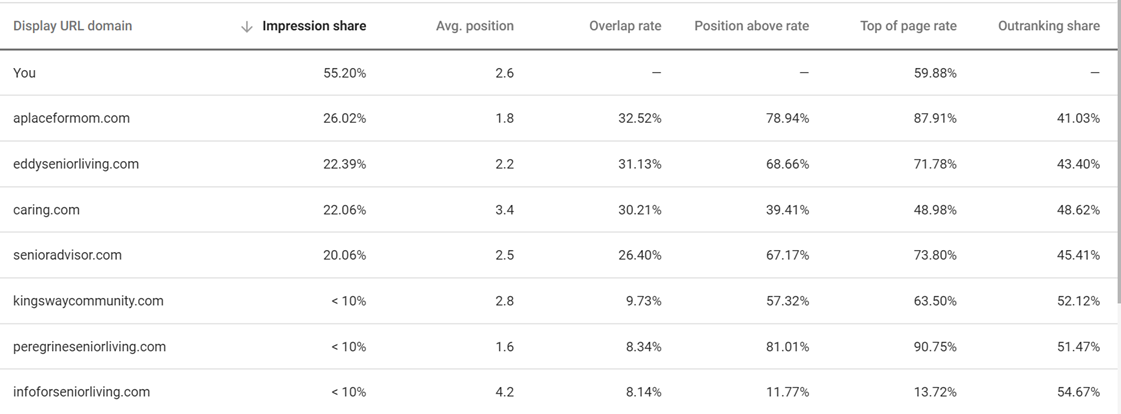
It’s also helpful to see what the competition is doing by reviewing competitor ads, landing pages, and incentives. Google’s Auction Insights report allows you to see who is bidding against you and their impression share compared with yours. Make sure you’re reviewing your competitive data monthly or quarterly. It can help you plan and revise your keyword and ad copy strategy.

An example of an auction insights report (via Google Ads)

Industry tools like SEMRush, KeywordSpy, and SpyFu also provide competitive information and enable you to automate monitoring. They’re worth checking out-you can be sure that most experts use them!

Even if you don’t dig deeper into the competitive data, however, implementing the above settings and ad extensions-as well as taking advantage of the latest expanded text specifications-will put you ahead of the competition. So get started today!
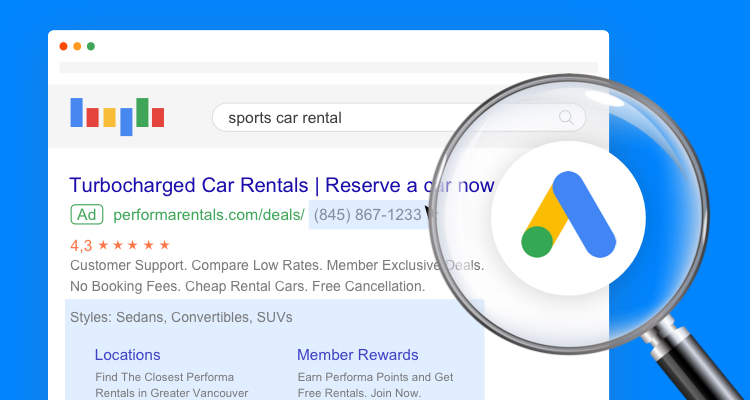
Hyper-Personalization: What It Is and Why You Need It in Your 2019 Marketing

Hyper-Personalization: What It Is and Why You Need It in Your 2019 Marketing

Do you appreciate a personalized experience? 

Close your eyes and think about the last time you had a personalized experience and how it made you feel. Maybe it was a personalized workout prepared for you at the gym, or the comfort of having your car automatically adjust the seat to your specifications when you slide in to take a spin, or the barista that starts preparing your specialty drink as you walk in the door.

A personalized experience establishes goodwill, increases loyalty, and brings a smile to your face.

So when we planned our research calendar at Ascend2, we knew that personalization was a topic we needed to cover. But not just basic personalization, like including a prospects first name on an email, but the next step in personalization: hyper-personalization.

What is hyper-personalization?

Hyper-personalization takes personalized marketing a step further by leveraging artificial intelligence (AI) and real-time data to deliver more relevant content, product, and service information to each user.

But what will hyper-personalization strategies look like in the year ahead?

Answers to this question are found in the new Ascend2 research report, Hyper-Personalization Strategies. The survey was fielded the week of November 26, 2018, and a total of 143 marketing professionals participated. 

Here are a few of the survey results and some ideas on how you can use the findings to plan your 2019 marketing strategy.

1. Beat Your Competition: Be a Hyper-Personalization Early Adopter

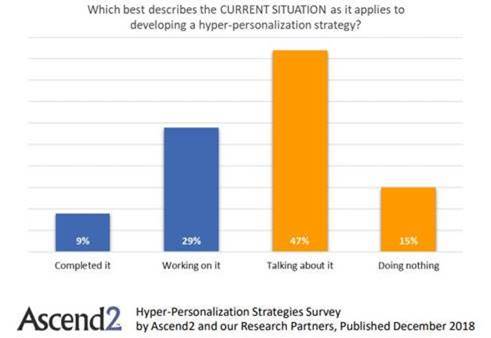
Only 9% of marketing professionals surveyed say they have completed the development of a hyper-personalization strategy. These are the early adopters. The majority, 62%, are either just talking about it or haven’t done anything about hyper-personalization yet. So if you start now and create and implement a hyper-personalization strategy, you will be a step ahead of your competition. Remember, “if you’re not the lead dog, the view never changes.” Be the lead dog and create a hyper-personalization strategy for your company.


Only 9% of marketing professionals surveyed say they have completed the development of a hyper-personalization strategy.
Click To Tweet


Hyper-Personalization Strategy

2. Top Priorities for Hyper-Personalization – Make a Difference in What Matters the Most

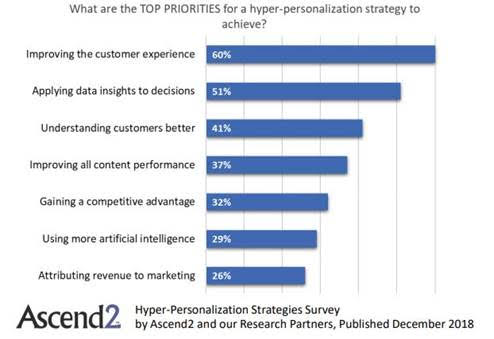
Improving the customer experience and applying data insights to decision-making are top priorities for 60% and 51% of marketing professionals, respectively. Any time you can improve the customer experience, you will reap the benefits. The more data you have about your audience, the ability to understand and learn from the data, and the skill to apply what you learn to customize the experience, will help you improve your marketing performance.


Improving the customer experience and applying data insights to decision-making are top priorities for 60% and 51% of marketing professionals.
Click To Tweet


Hyper Personalization Customer Experience

Keep your top priorities in mind as you create your hyper-personalization plan and refer back to your priorities as you evaluate your strategy. Ask the question: Is my strategy meeting my top priorities? Be careful not to implement a “cool” technology if it is not helping you meet your top priorities.

3. The Most Effective Apps for Your Hyper-Personalization Strategy (When You Need a Place to Start)

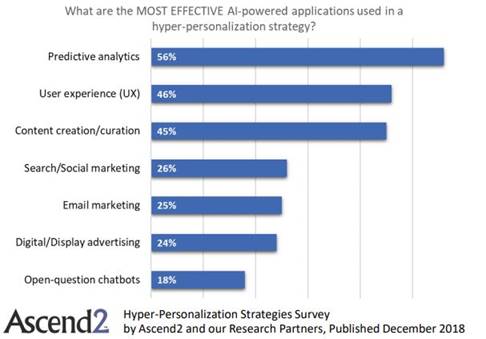
Tactically, the AI-powered applications used most effectively in a hyper-personalization strategy are predictive analytics, user experience (UX) and content creation/curation applications. If you need a place to start, review what is most effective based on the research below and determine what the best fit for you is. If content marketing is a primary marketing tool for your company, examine AI-powered apps that can be used in a hyper-personalization strategy. There are some great CMS tools that use AI to achieve amazing personalization of content.

Hyper Personalization Apps

Good News – Hyper-Personalization Works!

A total of 86% of marketing professionals consider the effectiveness of an AI-powered hyper-personalization strategy to be changing for the better, with nearly one-third (31%) considering the change to be significant. So your investment in AI-powered hyper-personalization will make a positive change – you just need to get started!


86% of marketing professionals consider the effectiveness of an AI-powered hyper-personalization strategy to be changing for the better.
Click To Tweet


You can review the entire Hyper-Personalization Strategies Survey Summary Report for guidance on creating your email and content marketing strategy. 

[Read More …]

Quick Ways to Make Your Google Ads Stand Out from the Competition

Google Ads amounts to billions of dollars in revenue for the search engine giant, but what about your revenue?

Standing out in this competitive-and, let’s face it, cluttered-environment can be a huge challenge for advertisers, especially if they’re just starting out. There’s only so much space on a search results page to go around, after all.

As we enter the 2018 holiday season, it’s the right time to take a good, hard look at your stale ads. It’s time to breathe some new life into them.

With that in mind, here are the features the pros use to stand out from the competition:

The Latest Expanded Text Ads

Google made their standard text ads larger by introducing expanded text ads (ETAs) in 2016. The increased character count was a boon for advertisers because it enabled messaging to reflect more of the advertiser’s key incentives.

Experts jumped on this new format immediately, even though Google didn’t require they switch until January 2017. Even then, advertisers could continue to run standard (shorter) ads, but they couldn’t edit them or launch new ones.

Some people hesitated, but advertisers who were slow to switch were at a disadvantage compared to those who immediately moved to the new format. The go-getters ended up with a huge head start since ETAs proved to have higher clickthrough rates (CTRs) than standard ads.

(And good CTRs = good quality scores = lower CPCs = better ad positioning.)

Now you have this opportunity again!

In August, Google further expanded their text ad format-expanded expanded text ads?-but taking advantage of these new character limits is still optional (hint: you should use them).

The latest iteration of expanded text ads introduces a second headline and more characters to all text fields, making text ads even more prominent. Here’s what’s new:

  • An additional, optional headline of up to 30 characters
  • An additional, optional description line
  • Both description lines can now be up to 90 characters (increased from 80)

And here’s a comparison of the three ad formats:

Google’s expanded text ads give you more space to connect with prospects.

These longer character counts may not sound like much-oh boy, ten more characters!-but they add up and can have a significant impact on how your ads look (and how they convert). See for yourself how the three types of ads look in a side-by-side comparison:

An example of how these ads appear in the search results.

The new ETAs feature up to 218% more text than the original “standard” format. As expected, search experts are already updating their ads to capitalize on the latest change-and this time you should too!

Even though the extra headline and description won’t show up all the time, they’ll help you stand out when they do by making the ad itself bigger. The third headline also gives you an extra thirty characters of highlighted blue text at the top of your ad.


Ad Extensions

Ad extensions are optional snippets of text that users can append to their ads. Google introduced the first extension-sitelinks-way back in 2009. These short links appear beneath the ad and direct searchers to different pages of the advertiser’s website.

But why stop there? There are now ten different types of manual extensions and six automated extensions that advertisers can use to compel more clicks:

Google ad extensions are free to implement and often improve your ad’s CTR.

On average, an ad’s CTR has the potential to improve by 10-15% per extension. Aside from adding functionality, extensions increase the surface area of your placement and are free to implement, so they’re a no-brainer.

Though every ad extension is potentially useful, there are four (highlighted in yellow above) that you must use (if you’re not already). This is because they’re easy to implement and they allow you to feature critical incentives and information about your business that would otherwise take up valuable ad copy.

1. Sitelinks

Sitelinks are valuable because they allow you to link deeply into your site. The number of sitelinks associated with your ad varies from 2 to 8. A great tip is to create specialty landing pages for each sitelink which are goal oriented and customized to the link. You can customize sitelinks at the ad group level too, making them even more relevant to specific searches.

Expert Tip: The Unbounce Builder is an excellent tool for quickly creating landing pages that match your ads’ sitelinks.

2. Callouts

Callout extensions can be up to 25 characters each and are not clickable. They promote features, benefits, and selling points of your business. They’re also a great way to highlight specific qualities of your business that you don’t have room to showcase in your primary ad copy. For instance, 250 5 star reviews, 5 convenient locations, all credit cards accepted, etc.

3. Call Extensions

Call extensions add a phone number without wasting any of the primary copy. On mobile devices, a callout extension lets people tap a button to call your business directly. Implementing call extensions is quick and easy, so you should include them in all applicable ads.

4. Structured Snippets

This extension gives users the option to include a list of products or services beneath their ad. Structured snippets contain a category header (e.g., services) followed by a list of items (e.g., pet grooming, pet sitting, dog training, de-shedding).

Using all of these snippets is a great way to differentiate your ad from competitors’ ads. You can get creative too. For example, if you’re a B2B database host, you could list the features included in your service (e.g., Cloud Automation, Advanced Security, Easy-To-Use Data Browser).

It’s worth noting, though, that when it comes to the categories you can choose, you’re restricted to Google’s preset list. The full list of snippet categories (headers) is available here. Here are some other structured snippet examples based on different ones:

  • Amenities: Free WiFi, Sauna, Early Check-In, Concierge Service, Continental Breakfast
  • Brands: Urban Decay, bareMinerals, Nyx, Tarte, Too Faced
  • Courses: Financial Training, Investment Banking, Business Economics, Fundraising

Using a few of the available extensions creates more opportunities to capture your prospects’ attention. It can even push your competition further down the page!

Here’s an example of how an ad would appear if all the above extensions showed at once:

An ad with structured snippets, call, callout, and sitelink extensions enabled.

Expert Tip: Not all ad extensions show up all the time, and they appear differently on mobile devices versus desktops. Google’s system tries to match the most appropriate extensions to the most relevant searches.


Geotargeting and other important settings

Implementing ad extensions along with the latest ETA format is sure to get advertisers more clicks. Yet this can be a double-edged sword because (sadly) most of us don’t have an unlimited budget.

Fortunately, there are some settings and features that you can (and should) use to minimize clicks from unqualified traffic. The settings we’re going to focus on are bid modifiers, geotargeting, remarketing for search ads (RSLA), ad scheduling, and negative keyword lists.

Bid Modifiers

Bid modifiers, or adjustments as Google calls them, enable you to increase or decrease bids based on when and how people search. Bid modifiers can apply to devices, locations, ad scheduling, and more. Advertisers bid up or down by percentages.

For example, if you want to bid more aggressively on mobile searches, you can adjust your bids to +30% for mobile devices. Likewise, if you want to appear for desktop searches, but would rather pay less for these types of clicks, you can adjust your bids to -30% for desktop devices.

Expert tip: Use Google’s reporting tools to test how your modified segments are performing and adjust bids regularly. You can review performance by location, audience, device, time of day, and more right from the Google Ads main interface.

An example of locations segment (via Google Ads)

Geotargeting

There’s more to geotargeting than just showing your ads in your desired locations. You can also refine where your ads appear by excluding certain locations and regions. You can get granular with this too by increasing or decreasing bids to your targeted areas using bid modifiers.

Geotargeting improves your ROI by minimizing clicks from unqualified prospects (e.g., people outside of your service area, neighborhoods below a certain income threshold, etc.). So it’s well worth the time it takes to set up and refine.

Ad Scheduling

Maybe you’re not open on weekends. Maybe no one is operating the phones after 8 pm every night. Maybe your strongest return on ad spend occurs between the hours of 10 am and 1 pm every day. Once you figure out the best time of day for your ads to appear, you can use scheduling to choose exactly when they show. This is an especially great feature when you have a limited budget.

Remarketing for Search Ads (RSLA)

Remarketing isn’t just for display ads anymore! This feature allows you to target search ads to people who have already visited your site. Your ads then appear when they search on Google for the keywords you’re bidding on. You can either append RSLA lists to existing ad groups or create groups that only show ads if a searcher is on your remarketing list. Google provides detailed instructions for setting up RSLA campaigns. It’s definitely worth investing the time to read.

Negative Keyword Lists

You can ensure your ad isn’t triggered for undesirable keywords by creating negative keyword lists and applying them at the account, campaign, or ad group level. The new Google Ads interface makes creating and assigning negative keyword lists simple. Create themed lists (e.g., competitors, locations, common terms) and assign them based on account performance or structure.

Expert tip: Check out Google’s search terms report to see exactly what people are searching for when they look at your ads, and then use this info to build your negative lists.


We’ve only scratched the surface…

The good news is that there are things you can (and must) do to make your brand stand out and to ensure it’s reaching the most qualified prospects.

Google gives you some powerful tools to help improve the clickthrough rate of your ads, which contributes to a higher quality score. And, in turn, higher scores help drive down your cost per click, give you a higher impression share, and make your ad more likely to show up than your competitors’. They can even help your ad appear at the top of the search results.

But blindly implementing these tips can only help you so far.

It should go without saying (but we’re saying it anyway) that you should test all ads with different ad copy (and extensions) and then refine them based on actual performance.

Effective ads-even those loaded with ad extensions-are also only part of a good PPC strategy. Landing page optimization, tracking, A/B testing are critical practices for a successful campaign. Setting clear goals is also very important.

It’s also helpful to see what the competition is doing by reviewing competitor ads, landing pages, and incentives. Google’s Auction Insights report allows you to see who is bidding against you and their impression share compared with yours. Make sure you’re reviewing your competitive data monthly or quarterly. It can help you plan and revise your keyword and ad copy strategy.

An example of an auction insights report (via Google Ads)

Industry tools like SEMRush, KeywordSpy, and SpyFu also provide competitive information and enable you to automate monitoring. They’re worth checking out-you can be sure that most experts use them!

Even if you don’t dig deeper into the competitive data, however, implementing the above settings and ad extensions-as well as taking advantage of the latest expanded text specifications-will put you ahead of the competition. So get started today!